How To
Below are some basic instructions for the Bingo Generator.
The Website is split into two main functions, the creation of the cards themselves, and adding a custom color or background
Creating a Set of Cards
Making the card(s) is very easy, below is a screenshot of the webpage. Follow the red numbers in order. Underneath the image is more information on each subsection.
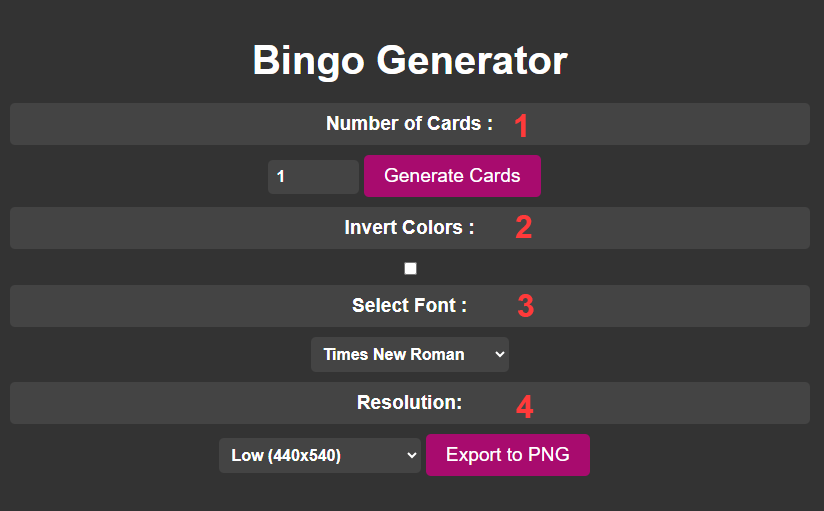
1. Indicate how many cards. Either use the up and down arrows or manually type in the desired amount. Make sure you press "Generate" before exporting.
2. Invert the colors. The default color is black, inverting it would make the board white.
3. Select a font, plenty to choose from. The font affects numbers and letters.
4. Select your desired output resolution. After selecting the desired output res. press the "Export to PNG" button. It will start the generation and download process.
Adding Background
Adding a background is very simple and a mostly automated process. Below is a screenshot of the webpage.
Underneath the image, is more information on each subsection.
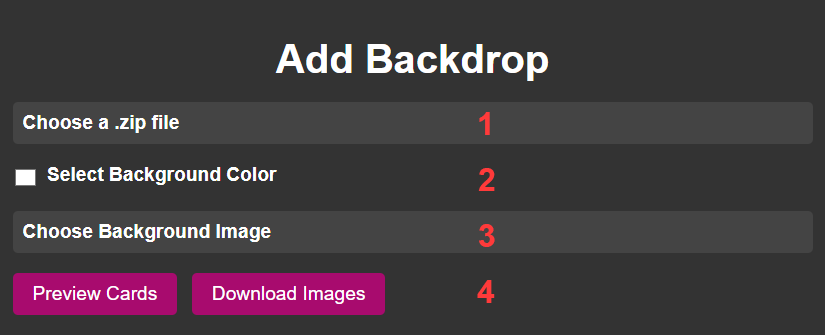
1. Click on "Choose a .zip File", this will open a file selection. Select the appropriate .zip file.
2. If you wish to use a solid color, click on the white square or "Select background Color". After you choose the desired color, click off.
Special note: You cannot select a color and background. Only one at a time.
3. If you wish to use a background image, click on "Select a Background Image". This will open a file selection, select the appropriate image file.
4. After you have uploaded and selected the appropriate options, click on "Preview Cards". If you like what you see, click on "Download Images". A .zip folder will download with the new card(s).